How to Withdraw Money from TikTok Shop
US TikTok Shop payouts go automatically to your linked bank once the settled amount reaches $1. Official settlement tiers, On hold tracking, and name-match rules.
US TikTok Shop sellers searching for how to withdraw money are usually looking for a button that sends earnings to a bank account. On official US Seller University pages checked on 18 November 2026, ordinary payouts work differently: once a qualifying bank account is linked, TikTok Shop automatically initiates a payout when your settlement amount reaches $1.
This guide is only for the United States. It summarises official US Academy and Policy Center pages. We have not operated a live US seller account, so we do not describe button placement beyond the official paths, and we do not restate withdrawal flows from other markets.
Primary official sources, all re-fetched on 18 November 2026:
- Finance & Settlement 101 (updated 10 August 2026)
- Finances Page FAQ (updated 11 August 2025)
- Dynamic Settlement and Reserve Policy (updated 31 July 2026)
- Scheduling your payouts (updated 20 August 2025)
For fee deductions that change the settlement amount, see the US fees guide. For how refunds are decided, see the US return and refund policy. Shop Performance Score, which official pages use for faster settlement tiers, is in the SPS guide.
First, link a bank account
Official Finance & Settlement 101 calls a verified bank account the first mandatory step to receiving earnings. You can start from two Seller Center paths:
The same page describes a zero-tolerance identity match rule: the bank account holder’s name must exactly match the business name or individual name provided during Seller Center onboarding. A mismatch “will prevent successful linking and payout.”
Account type also has to match the shop’s registration:
| Shop registration type | Required bank account type (official) |
|---|---|
| Corporate / business | Corporate bank account |
| Individual | Personal bank account |
| Sole proprietorship | Personal bank account |
If you later change the primary bank account, official text says payouts already in transit still go to the old account, and only future payouts (funds settled after the change) go to the new one.
When the money actually settles
The settlement clock starts when the order is successfully delivered, not when the customer places it. Official Finance & Settlement 101 lists these ordinary tiers, which it ties to Shop Performance Score:
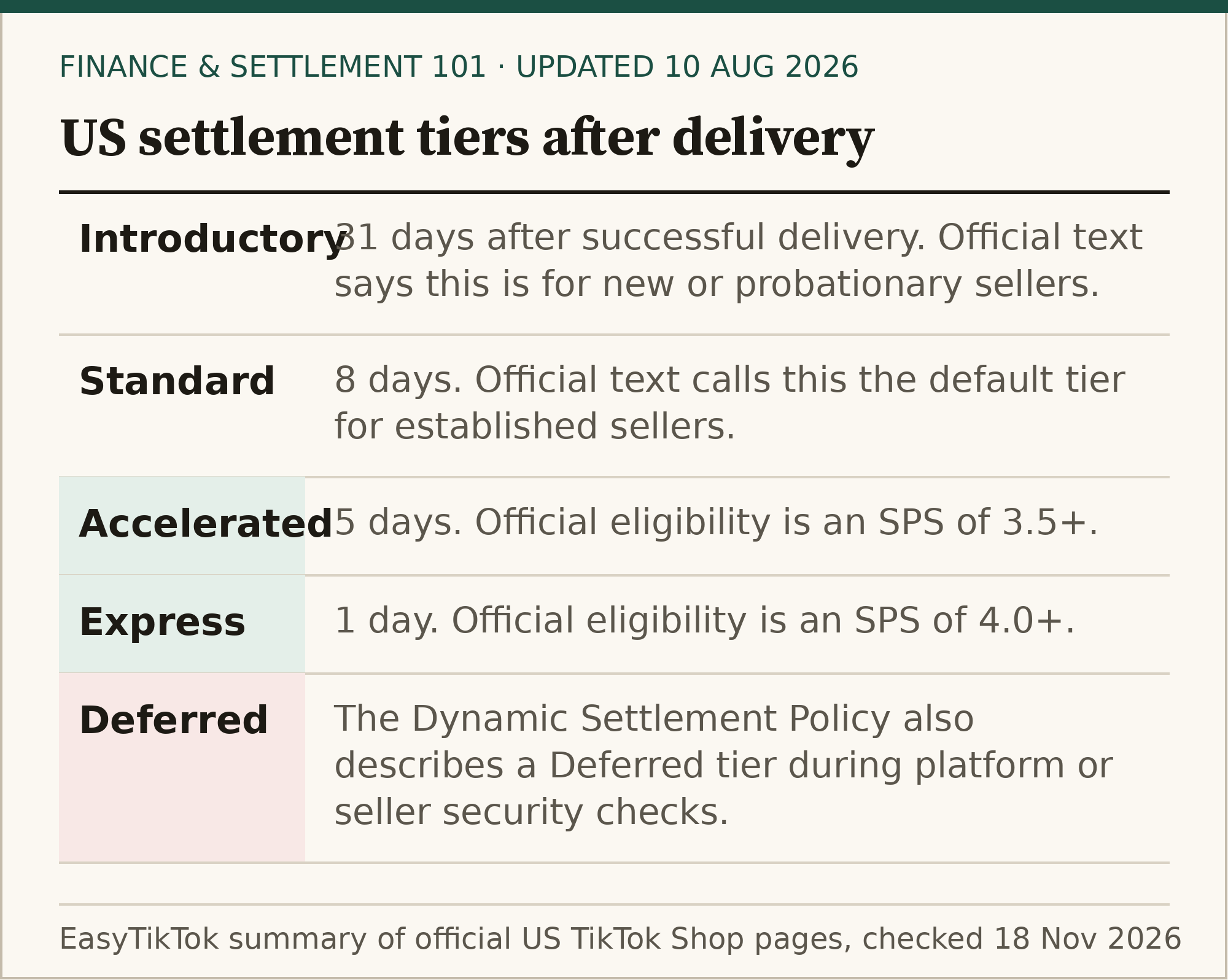
| Official tier | Days after delivery | Official eligibility note |
|---|---|---|
| Introductory | 31 | New or probationary sellers |
| Standard | 8 | Default tier for established sellers |
| Accelerated | 5 | Requires SPS of 3.5+ |
| Express | 1 | Requires SPS of 4.0+ |
The Dynamic Settlement and Reserve Policy adds a fifth Deferred Settlement Period, used while TikTok Shop completes platform or seller security checks, and says sellers may be moved into it at any time during the month. It also says settlement tier and reserve level are normally reviewed on the 1st day of every month, based on SPS, orders successfully delivered in the previous 15–45 days, and any temporary account restrictions.
Official policy text tells sellers to aim for an SPS above 4.0 for better terms, and to check SPS in Seller Center. That is a platform recommendation, not a guarantee that any one shop will reach Express.
The Finances Page FAQ gives the same overall range in shorter form: payout is initiated 1 to 31 days after the delivery date, “the better you perform, the faster TikTok Shop pays you,” and after-sales requests must be resolved before the payout is sent.
The $1 automatic payout, not a withdraw button
Official FAQ definitions are the cleanest statement of how US payouts work:
If a payout shows as Failed, official text only states that the money was not deposited. Check that the bank account is still linked, that the name still matches, and that the shop is not blocked from withdrawals by an Account Health milestone; those withdrawal holds are explained in the US Account Health and violations guide.
Track On hold, Processing, and Paid
The official Finances summary walk-through has three buckets.
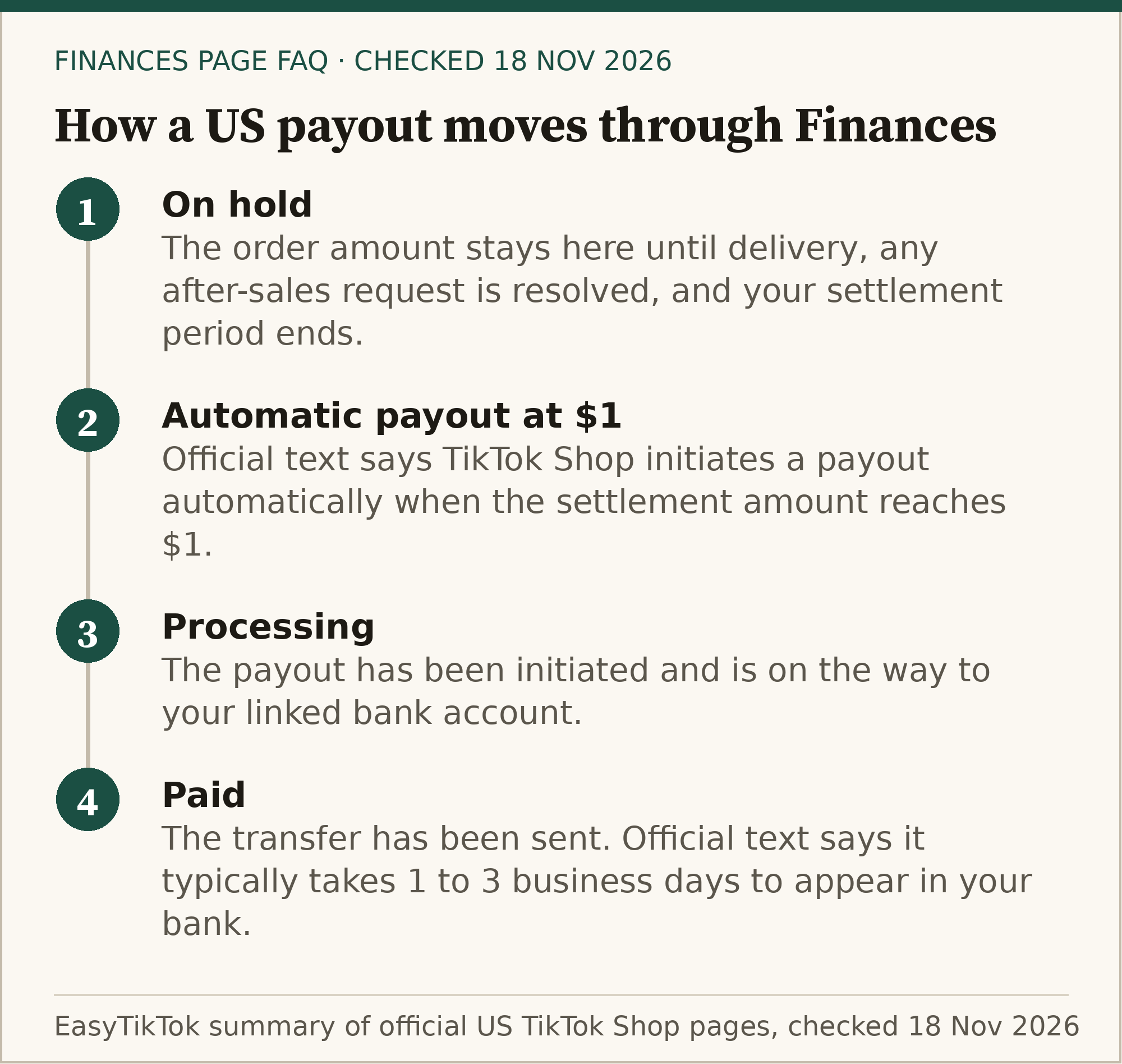
On hold
After a customer places an order, the amount is added to On hold. Official reasons are waiting for package delivery, waiting for a completed refund or return, or the order has been delivered and is awaiting settlement. The figure can still change if there are refund claims or shipping-fee adjustments.
Processing
After TikTok Shop initiates the payout, it appears under Processing. The $1 minimum and negative-balance carryover still apply at this stage.
Paid
Once the payout is transferred to your bank, the status changes to Paid. Official advice is to reconcile payout records with your bank statements. Statements can sit in Pending when the current settlement amount is negative.
You can also see whether you qualify for Standard, Accelerated, or Express settlement on the Shop Performance Score page, or see the specific settlement period for an order in the On hold section.
How refunds and reserves change what you receive
Refunds do not wait for the next philosophical debate about your cash flow. Official Finance & Settlement 101 says the refund is deducted from your available wallet or account balance, and if that balance is too small, from your next scheduled payout. That is one reason a payout can be delayed or reduced after a busy returns week. The same page says seller-fault returns leave you paying return shipping, while some approved non-seller-fault returns may receive a platform logistics subsidy. Confirm the case in front of you on the official returns policy.
The Dynamic Settlement and Reserve Policy also assigns each shop a reserve level. A portion of earnings for each delivered order is held for 30 days from the delivery date to cover possible returns or refunds, then unused reserves are released. Official text names three reserve levels (Level 1, 2, and 3) but does not, in the extractable text we fetched, publish the percentage held at each level. We are not inventing those percentages; check the reserve figures shown in Finances for your shop.
The same policy mentions an optional Daily Advance feature, described as providing up to 80% of the shipment amount the day after shipment, with eligibility and costs set by a third-party financing partner, Storfund. That is not the standard payout. Use the official Daily Advance article in Seller Center if the product is offered to you.
Optional payout scheduling (selected sellers)
Scheduling your payouts describes a control that lets selected sellers choose every day, every business day, every week, or every month. Official text is explicit that the feature “is currently in testing and is available only to selected sellers,” on the Seller Center website, with seller-app support planned later.
If you have it, official steps are: open Payout: daily or Payout schedule from the Finances summary, pick the frequency (and the weekday or month-day if needed), then submit. Changes take effect immediately. A monthly date that does not exist in a short month is paid on the last day of that month. Switching from daily to weekly can delay pending payouts until the next chosen weekday.
Even with a weekly or monthly schedule, official text says TikTok Shop still follows the Dynamic Settlement Policy when settling funds to the shop account. Net earnings are the amount already settled but waiting for the scheduled payout, or pending retry after a failed payout, and official text says net earnings cannot be negative.
What we are not claiming
- We did not find an official US page that describes a manual “Withdraw,” a withdrawal password, or a once-every-24-hours cap. Those details appear on some unofficial guides and on Seller University pages for other countries. They are not restated here as US rules.
- We are not publishing reserve percentages or Daily Advance fees that were not in the official text we could extract.
- Bank arrival in 1 to 3 business days is the official typical range, not a guarantee from your bank.
If Account Health Rating falls to official milestones, withdrawal itself can be paused. That is a US AHR rule, covered in TikTok Shop violations and Account Health.