Affiliate Commission Rates, Locks, and Payouts
How US TikTok Shop affiliate commission works: the 1–80% range, Target vs Open rates, Shop Ads commission, the 30-day lock, and official payout formulas.
This page is the tighter US commission-rate guide. For program eligibility, collaboration types, and how creators join, use the TikTok Shop affiliate program overview. Every range, lock, and payout rule below is taken from official US Seller University pages re-fetched on 18 November 2026. We do not invent average category rates or “what converted for us.”
Affiliate commission sits on top of the platform referral fee; it does not replace it. See TikTok Shop fees 2026 and the profit calculator if you want to model both.
The official rate range
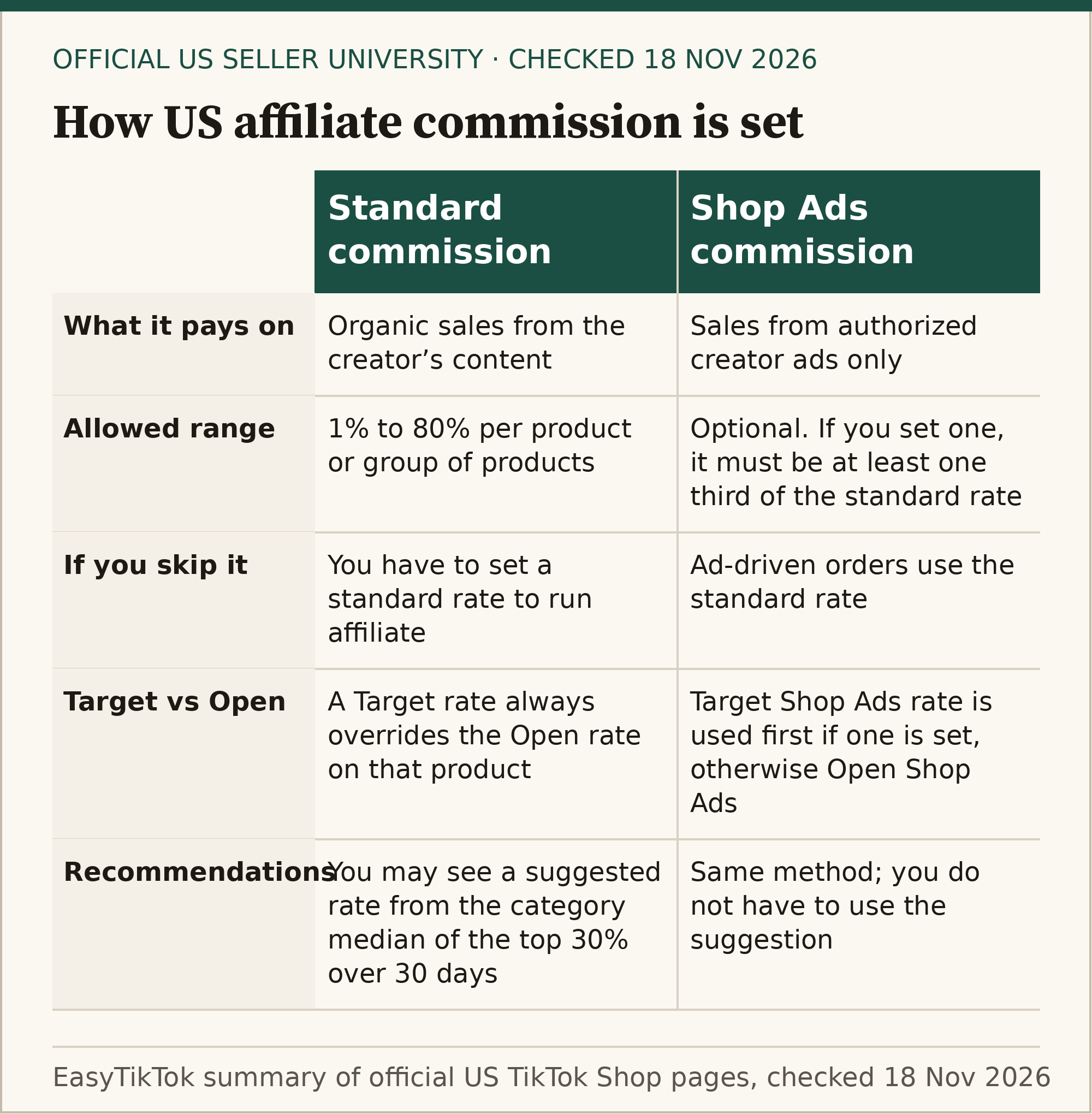
Official Setting Up Affiliate Collaborations guidance, updated 10 November 2026, says:
- You can set commission from 1% to 80% on Open or Target Collaborations, for one product, a group of products, or all products in an open plan.
- A product can sit in more than one collaboration at the same time, but the creator is paid only one rate on that product.
- The Target Collaboration rate always supersedes the Open rate. Official text recommends making the Target rate higher.
- You can set a standard rate and, optionally, a Shop Ads rate. If you do not set a Shop Ads rate, official text says orders from ads use the standard rate. Turning the Shop Ads rate off does not disable Video Shopping Ads on the creator’s content.
Official Shop Ad commission rate recommendations guidance, updated 13 May 2026, adds two hard rules and one suggestion:
- A Shop Ads rate must be at least one third of the standard rate. The platform flags a rate that does not meet that threshold.
- Recommended rates are built from the last 30 days in the product’s category. Official text says TikTok Shop takes the top 30% of products, scored on creator click-through rates and product-selection rates, and uses the median commission in that group. If you edit products from several categories at once, you may see a recommended range rather than a single percentage.
- You do not have to use the recommendation. Official FAQ text says you keep 100% control of the rate you set.
The 30-day commission lock
This is the part most sellers need before they cut a rate.
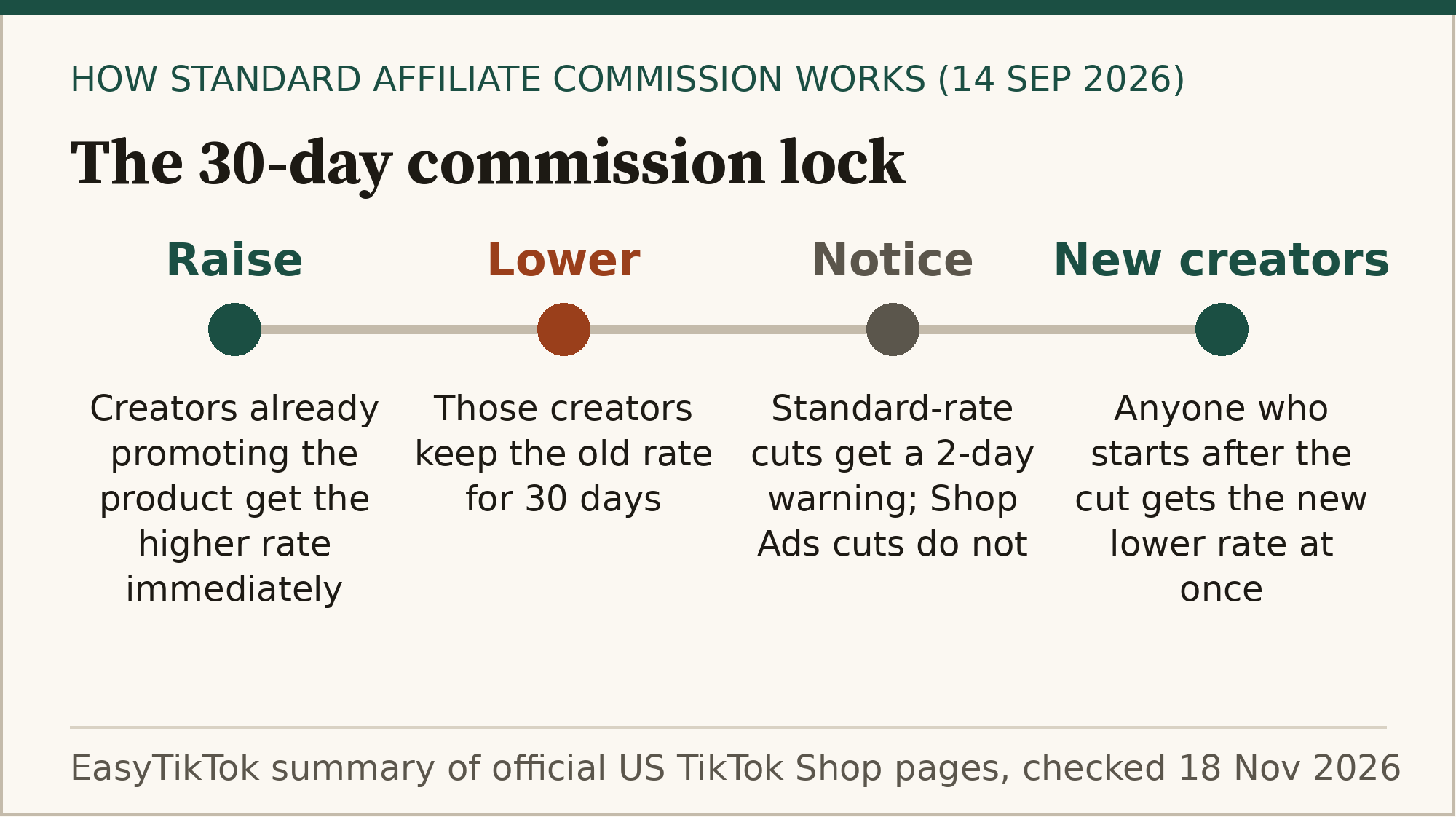
Official How Standard Affiliate Commission Works guidance, updated 14 September 2026, aligns standard and Shop Ads rules:
- When a creator starts promoting a product, official text says their rate is guaranteed for 30 days.
- If you raise the standard or Shop Ads rate, creators already promoting the product get the higher rate immediately. There is no 30-day wait on an increase.
- If you lower the rate, those creators keep the old rate for 30 days. For a standard decrease, they also get a notification two days before the lock expires. Official text says there is no two-day notification for a Shop Ads decrease; creators see the grace period in their showcase instead. In Open Collaboration, a clock icon can appear next to a Shop Ads rate that is still in the protection period.
- Creators who start promoting after you lower the rate receive the new lower rate, and then keep that rate for their own 30-day window.
- If no creator is promoting the product, official FAQ text says a decrease takes effect immediately.
- If a creator removes the product from their showcase or deletes the associated content, they lose the locked rate. If they promote it again, they get the current rate.
- If you delete a product and re-add it at a different rate, official text says the commission-rate history resets, and associated product links are removed from creators’ videos.
On the commission history view, official notes also tell sellers to check the Status column for the active rate, and say a new commission may take 30 days to take effect in Open Collaboration and 5 days in Target Collaboration. Use that history screen to see which rate is actually active, rather than assuming an edit in the form is already the live rate for every creator.
How the payout is calculated
Official standard-commission text gives the formula in two equivalent ways, then explains when the number becomes final.
- Commission = (Revenue − Refunds) × Commission Rate
- The working estimate at payment time is actual paid price × commission ratio
After the buyer receives the goods and the after-sales period ends:
- no refund: actual commission equals the estimate;
- partial refund: (actual paid price − refund amount) × commission rate;
- full refund: 0.
Estimated commission shown when the buyer pays is not final. Official FAQ text also says that on the “not settled” tab, actual commission can still show as 0 because the order has not settled yet.
Official payout timing for creators:
- they typically receive commission 15 days after delivery;
- payment waits until the seller’s order is settled, so a longer settlement period such as delivery + 31 days also delays the commission;
- commission is not paid until a dispute, refund, or return is resolved.
Creators find the balance in Creator Center → Earnings. Self-selling through the merchant’s own official account does not pay affiliate commission; official text reserves affiliate commission for creators (or another merchant) promoting the shop’s products.
Optional: tiered commissions in Open Collaboration
If you want the rate itself to rise with order volume, official How to use tiered commissions in Open collabs guidance says you can switch a product from a single rate to rates tied to order volume. Official limits to treat carefully:
- a flat rate and a tiered rate are mutually exclusive;
- official text says only two tiers are available today;
- once the tiered commission is active, order thresholds cannot be changed, and commission rates can only be increased;
- once a creator reaches the higher tier on that product, official FAQ text says they keep the higher rate on later qualified sales of that product — it does not drop back down if sales slow;
- before the threshold is reached, official text says the platform may withhold commission at the higher rate and then settle at the actual applicable rate, refunding any over-withholding. The “Est. Standard commission payment” is not the final amount if there are returns or if the lower tier still applies.
Creators see a commission range on a tiered product. Official text says you can also tell them the milestone in IM.
What to do this week
- Confirm each product’s standard rate is between 1% and 80%, and that any Target rate is the one you actually want to pay, because it overrides the Open rate.
- If you set a Shop Ads rate, check that it is at least one third of the standard rate, and that you are not surprised by the 30-day lock when you later lower it.
- Before cutting a rate, look at how many creators are already promoting the product. Official guidance says those creators keep the old rate for 30 days.
- Treat estimated commission as provisional until the after-sales period ends, especially during BFCM return windows.
- If you try tiered commissions, set the order threshold carefully — official text says you cannot change it once the tier is live.
FAQ
The questions below match the FAQ in the page metadata.
Sources
All pages were fetched on 18 November 2026. “Updated” dates are TikTok Shop’s own dates.
- Setting Up Affiliate Collaborations (US Seller University, updated 10 November 2026). 1–80% range, Open vs Target, rate priority, and optional Shop Ads rates.
- How Standard Affiliate Commission Works (updated 14 September 2026). 30-day protection, payout formula, 15-day typical payment, carousel 60% note, and history/status windows.
- How to use Shop Ad commission rate recommendations (updated 13 May 2026). One-third threshold and how recommended rates are calculated.
- How to use tiered commissions in Open collabs. Two-tier limit, locked thresholds, and settlement withholding.
- Related EasyTikTok guides: affiliate program, TikTok Shop fees 2026, GMV Max, and free samples.