How to Offer Free and Refundable Samples
How US TikTok Shop sellers set up free and refundable samples: who pays, the 7-day review and ship windows, Open vs Target collabs, and auto-approval quotas.
This guide is for US sellers who want to offer product samples to TikTok Shop creators. It summarises official Seller University pages we re-fetched on 18 November 2026, especially How to set up and manage samples (updated 10 November 2026), How to set up sample auto-approval automations (updated 16 July 2026), and the creator-facing Guide to Samples: Free and Refundable (updated 11 November 2026). It is not a UK or EU sample policy.
Creators looking for the request-side flow should start with TikTok Shop for creators. Commission rates sit in a separate guide: TikTok Shop affiliate commission.
Free samples vs refundable samples
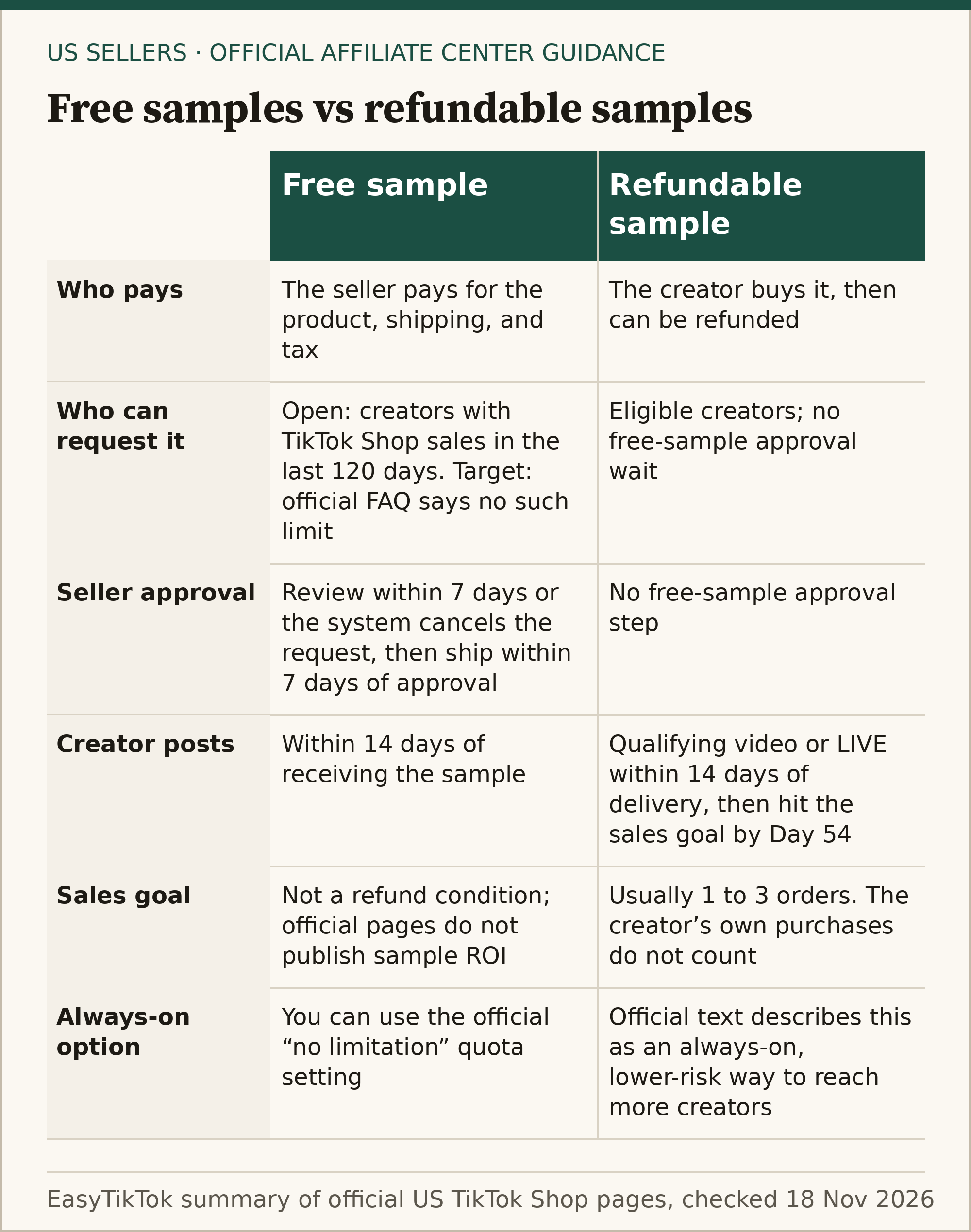
Official Affiliate Center guidance lets you offer two types of samples, and in most cases you can offer both on the same product.
Where to set samples up
From Seller Center, open Affiliate Center. Official guidance gives two starting points.
Official FAQ text is explicit about eligibility: free samples in the open marketplace are limited to creators who have generated sales in the last 120 days. It also says there are no limits with Target Collaborations.
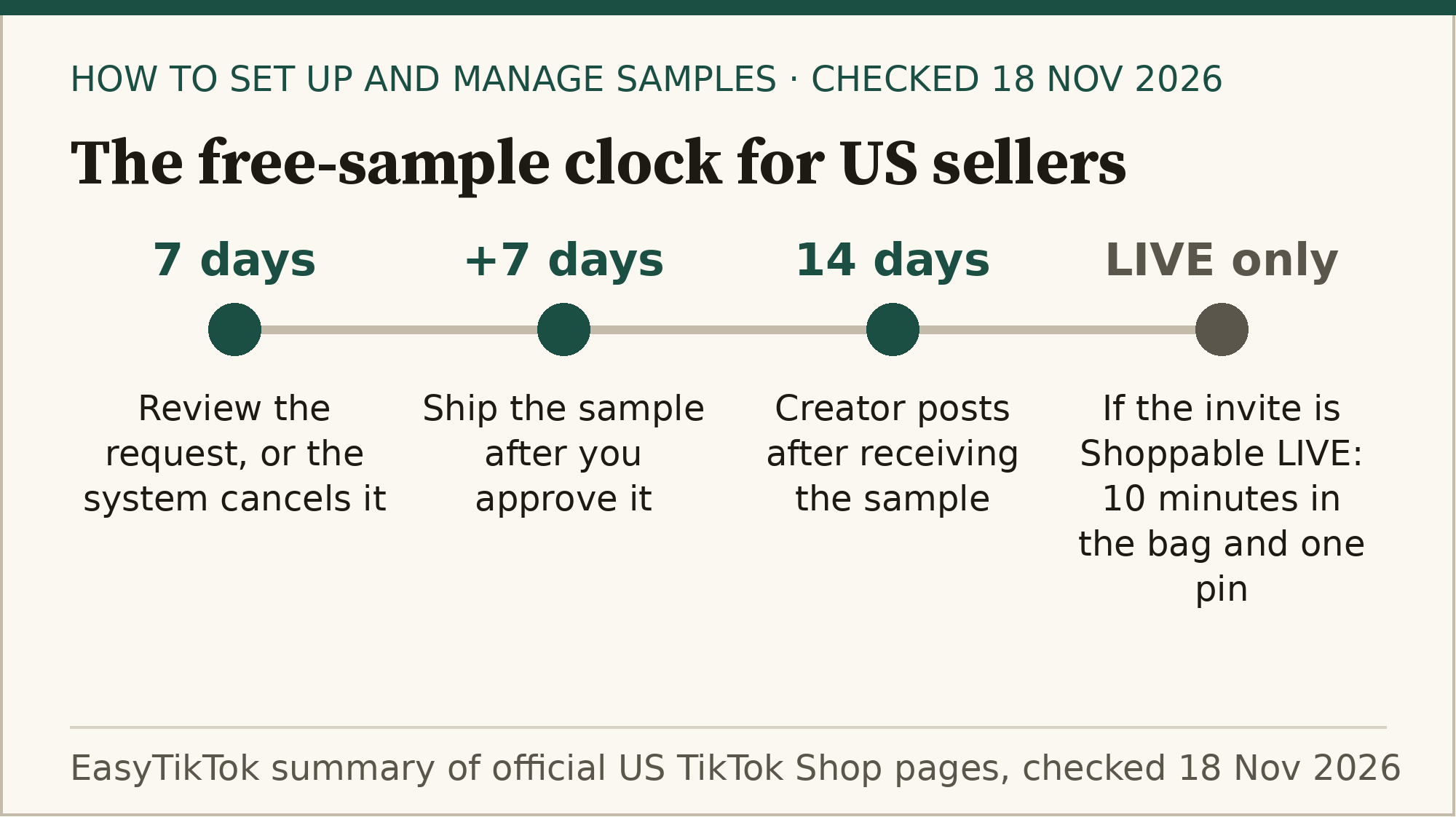
The 7-day, 7-day, 14-day clock
Once a free-sample plan is live, creators appear on the Sample Requests page.
Review in To Review
Official guidance says you can see creator stats and Approve or Reject each request. Approved requests move to Ready to ship. Approval can fail if there is insufficient sample quantity or insufficient product stock. A product’s free-sample quota falls by 1 for each approval, unless you use the official no limitation option as an always-on strategy.
Do it within seven days
“You must review free sample requests within seven days, or the system will automatically cancel them.” That sentence is official. Batch approval and rejection still work, and you can filter by things such as category, follower count, and performance metrics — check the filters actually shown in Affiliate Center.
Ship within seven more days
After approval, official guidance gives you another seven days to ship the sample from Seller Center. Creators can withdraw a request before you process it for shipment.
The creator’s 14-day posting window
Official creator guidance requires promotional content within 14 days of receiving a free sample requested from a seller. TikTok Shop says it notifies the creator 3 days and 1 day before that window ends. For a LIVE-only Target Collaboration, official text says fulfillment means keeping the product in the LIVE shopping bag for at least 10 minutes and pinning it at least once; a short video does not complete that obligation.
The Sample Integrity Policy (updated 14 May 2026) is the official rule that limits creators who receive free samples and do not post. Official creator text also says an overdue free sample keeps using the creator’s sample limit until they post; it no longer frees up on its own.
Auto-approval, without handing out every sample
If you do not want to review every request by hand, official Seller University describes a shop-level automation on Sample requests → Automations.
Official guidance, checked on 18 November 2026, says you toggle auto-approval on, then set:
- a mandatory shop quota between 1 and 100 (the cap on how many samples this automation can approve);
- optional creator filters such as 30-day GMV, estimated posting rate, and category;
- an optional price limit, so expensive inventory is not auto-approved.
Requests that meet every rule, and that still fit under the quota, go straight to Ready to ship with an Auto Approval tag. Anything that misses a rule, or arrives after the quota is used up, falls back to manual review. Official FAQ text says this works for Open Collaboration (manual free samples) and for Target invitations that use your existing sample strategy. It does not apply to refundable samples, auto-optimized samples, or Target Collaboration’s fully automated approval cases.
Creators who meet your rules may see a 100% approval tag when they apply. Official text also says product-level hiding thresholds still run first: if a product is hidden from a creator, they cannot apply, and auto-approval never sees the request.
After the sample goes out
Official setup guidance also covers monitoring and optional ratings:
- Track fulfillment and whether the required content went up, in Sample Requests and Seller Center.
- You may rate a creator on a free sample after the content has stayed published for at least 3 days, or after the product has been pinned in a LIVE shopping bag for over 10 minutes. If the creator has not posted, official text says you may rate once the product was delivered at least 14 days ago, or 21 days after delivery if they requested more time, or immediately after an appeal is resolved.
- Official text says you cannot rate the creator if the collaboration was canceled due to the seller’s fault, if the product was out of stock for more than 10 days, if the product or shop received a permanent GNE violation, or if the product was delisted.
For refundable samples, official seller FAQ text says you may rate when the sample was successfully refunded. SKU-level sample controls apply to free samples only.
What to do this week
- Decide, product by product, whether you are offering free samples, refundable samples, or both, and remember that free samples are paid for by the shop.
- If you use Target Collaboration, set the content type (LIVE only vs no preference) before you send the invite — official text says you cannot change it later.
- Check Sample Requests every few days so you do not miss the 7-day review window.
- If you turn on auto-approval, set a shop quota you can actually ship, and a price limit if some listings are too expensive to give away automatically.
- After shipping, watch the 14-day posting window rather than assuming the sample will turn into sales on its own. Official pages do not publish a typical sample ROI.
FAQ
The questions below match the FAQ in the page metadata.
Sources
All pages were fetched on 18 November 2026. “Updated” dates are TikTok Shop’s own dates.
- How to set up and manage samples (US Seller University, updated 10 November 2026). Seller setup, who pays, 7-day review and ship windows, Open vs Target, content type, quotas, and ratings.
- How to set up sample auto-approval automations (updated 16 July 2026). Shop quota, optional creator filters, price limits, and what the automation does not cover.
- Guide to Samples: Free and Refundable (updated 11 November 2026). Creator eligibility, the 14-day posting window, refundable-sample goals, and overdue-limit rules.
- How to use refundable samples. Seller-side refundable-sample FAQ, including that the creator’s own purchases and SKU-level controls do not work the same way as free samples.
- Sample Integrity Policy (updated 14 May 2026).
- Related EasyTikTok guides: TikTok Shop for creators, affiliate program, and affiliate commission.