TikTok Shop Germany: How to Register and Sell
How to sell on TikTok Shop Germany (Deutschland): official seller types, Handelsregister, VAT IDs, GbR rules, the 2–3 day review, and EU fees.
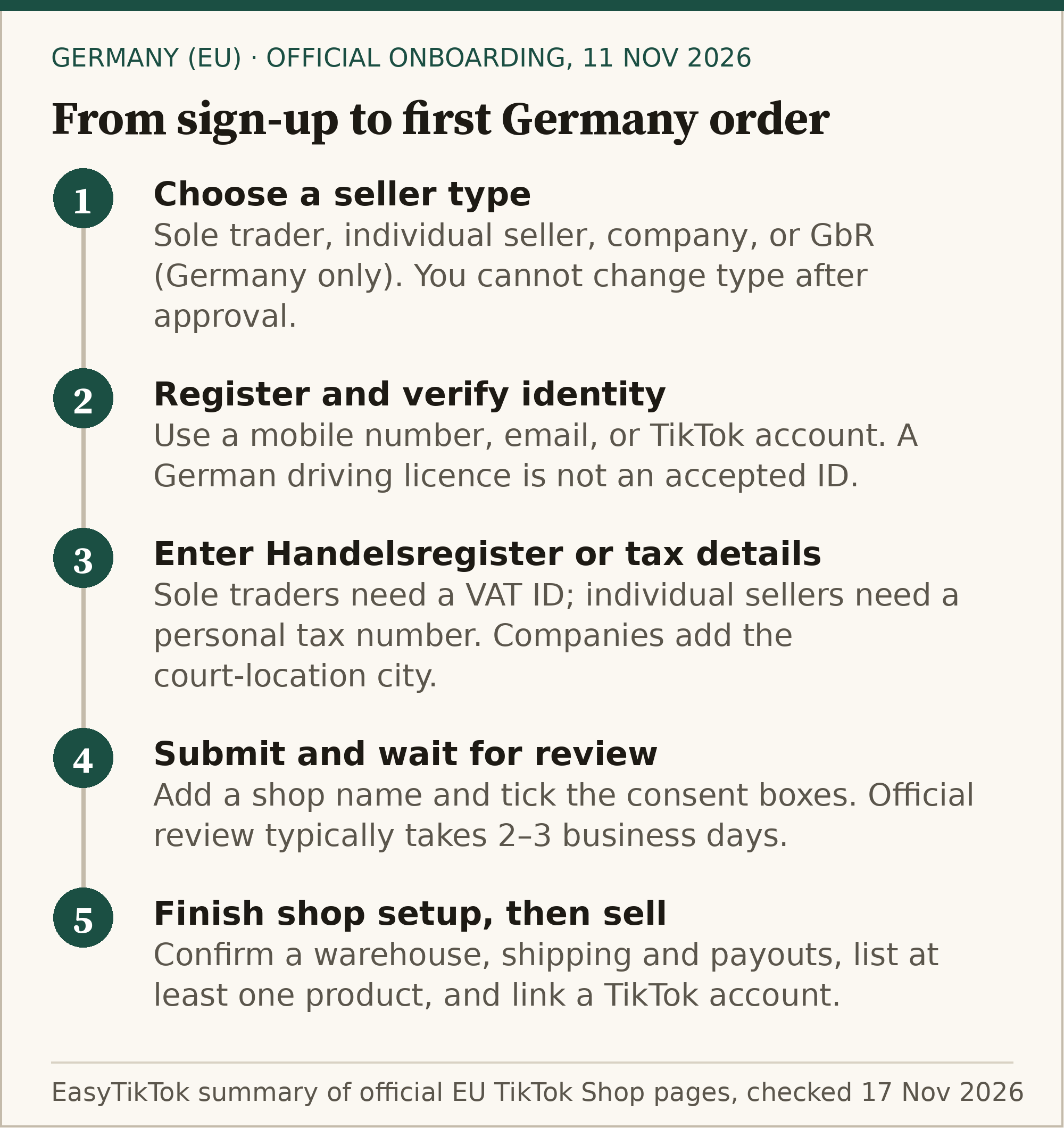
To sell on TikTok Shop in Germany (often searched as TikTok Shop Deutschland), register a Germany shop as your source (home) shop, pass identity and tax or registry checks, and wait for approval. The official TikTok Shop EU Seller Onboarding Guide, dated 11 November 2026 and re-fetched on 17 November 2026, says review typically takes 2–3 business days. When you sell, official EU commission is 9% (or 7% for eligible Electronics), with a limited-time 4% new-seller rate if you qualify.
Germany has a few rules that France and other EU countries do not: a VAT or personal tax number depending on seller type, a court-location city for registry numbers, no driving licence as an accepted ID, and a GbR path that exists only in Germany. This is an English guide to those official rules. We have not run a Germany shop for this article. For the France path, see TikTok Shop France.
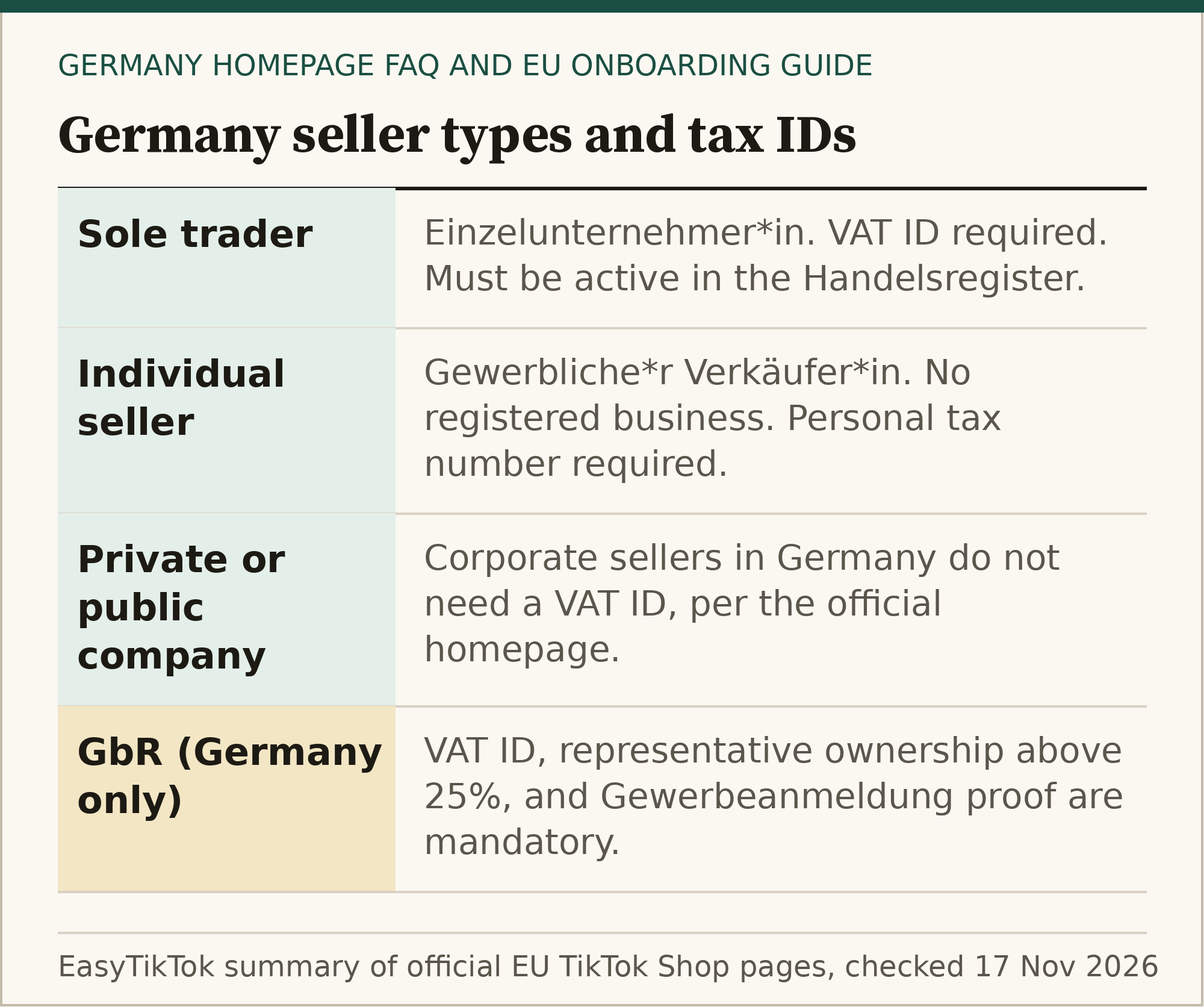
Step 1: Choose the right seller type
Germany supports every EU seller type, including GbR, which is available only here. The official Germany seller homepage uses these German labels:
Pick the type that matches your official documents. The official guide says a mismatch can delay verification, and you cannot change seller type after approval.
Step 2: Register and verify your identity
Start from the Germany seller homepage or the Germany Seller Centre at seller-de.tiktok.com. Official registration methods are a mobile phone number, an email address, or an existing TikTok account.
You do not need a TikTok account only to register. You will need one later to post shoppable content or host LIVE. Each phone number and each email address can be used for only one TikTok Shop seller account worldwide.
All sellers complete ID verification, facial verification, and address verification. Official accepted ID types for Germany are narrower than for France:
The document must be valid, match the name used for registration, and be clearly readable. You upload front and back, then record a selfie or short video as instructed.
Proof of address must be less than three months old. Officially accepted in all EU countries: a utility bill (water, electricity, gas, mobile or internet) or a bank statement. The Germany row in the official country-specific table does not add extra document types. Officially not accepted: invoices, bank receipts, a rent bill, a home or car insurance receipt, or pension certificates.
If you are a company or sole trader, enter the address on your official business registration. If you are an individual seller, the Germany homepage says you may use your personal address.
Step 3: Enter Handelsregister and tax details
If you register as a sole trader or a company, official FAQ says the business must be legally registered and active in Germany’s Handelsregister. Inactive, dissolved, or suspended companies are not eligible. Enter names, numbers, and the registered address exactly as they appear in the register. For Germany, official onboarding also asks for the city where the business is registered (court location) alongside the registration number, for both sole traders and companies.
Germany tax IDs depend on seller type. The two official pages we used agree on the main split, and we quote both:
Company representatives must reside in the registered country, complete ID checks, and provide proof of address. An authorised user also needs a signed authorisation letter from an active director. Some sellers may be asked for ultimate beneficial owner (UBO) details.
Step 4: Submit and wait for review
Enter the shop name customers will see (a logo is recommended), confirm your email and phone number, review the form, and tick the required consent boxes. Official guidance: you may change the shop name once per month after onboarding.
Once submitted, review typically takes 2–3 business days. If the application is rejected, the reason is sent to your registered email; you can correct the file and resubmit from the Seller Centre homepage.
Step 5: Finish shop setup after approval
Approval is not the last step. Official FAQ says you must complete shop setup in Seller Centre before you can sell, including confirming a warehouse address, setting shipping and payment, listing at least one product, and linking a TikTok account. The Sell Across Europe guide also recommends connecting a TikTok account on each shop.
Commission and new-seller rates
Selling fees are set in the official EU commission policy: 9% on settled orders, inclusive of applicable taxes such as VAT, or 7% for eligible Electronics (including Beauty & Personal Care Electronics). From 15 June 2026, an eligible new seller opening a first EU shop who completes the official mission may pay 4% for 60 days in Germany (the same band as France, Spain, Italy, and Ireland). Existing EU sellers opening another country shop do not qualify.
The Germany homepage fetch we used on 17 November 2026 did not include a launch-reward amount in the extracted text, so we have not quoted one for Germany.
Sell Across Europe from a Germany home shop
The official Sell Across Europe guide, dated 13 November 2026, says you can register a Home Shop in any of 13 EU markets — including Germany and France — and then list and ship to the others from one Seller Centre account. After Home Shop setup, Destination Shops are created automatically. Review warehouse, shipping, payment, tax, and product eligibility in each shop. Future warehouse or shipping changes are managed per shop and do not stay in sync automatically. EPR and other tax rules may apply in destination markets.
Official New Shop Probation applies across active EU shops, and graduation in one or all active shops graduates all markets at the same time:
Those caps are from the Sell Across Europe guide dated 13 November 2026. They are EU figures, not US or UK probation rules.
Claims we could not verify
Germany launch checklist
- Start at seller.tiktok.com/de or seller-de.tiktok.com and choose Germany.
- Pick the seller type that matches your documents, including GbR only if that is your legal form. You cannot change type after approval.
- If you are a sole trader or company, confirm that the business is active in the Handelsregister, and have the court-location city ready.
- Prepare the right tax ID: VAT ID for sole traders, personal tax number for individual sellers, and the extra GbR documents if they apply.
- Use a passport, Personalausweis, or permanent residence permit — not a driving licence — plus proof of address less than three months old.
- After approval, finish warehouse, shipping, payout, first listing, and TikTok account linking, then price in the official rates in the EU fees guide.
FAQ
The questions below match the FAQ in the page metadata.
Sources
All pages were fetched on 17 November 2026. “Updated” or article dates are TikTok Shop’s own dates.
- TikTok Shop Germany seller homepage. Seller types, individual-seller path, VAT and personal tax-number FAQ, and address guidance.
- TikTok Shop EU Seller Onboarding Guide (Seller University, dated 11 November 2026). Registration methods, business types including GbR, Handelsregister, Germany tax IDs, court location, ID and proof-of-address rules, 2–3 business day review, and the ban on changing seller type after approval.
- Sell Across Europe: The All-in-One Guide (Seller University, dated 13 November 2026). 13 markets, Home and Destination Shops, and EU New Shop Probation caps.
- EU commission rates are cited in our EU fees guide.