How to Sell on TikTok Shop
How to set up a US TikTok Shop and start selling: eligibility, documents, tax, shipping, listings, and linking your official account, from Seller University.

Selling on TikTok Shop in the United States is a Seller Center process, not a guesswork funnel: register, verify your identity or business, submit tax details, add a ship-from address, list products, and link one Official TikTok account. After that, you reach buyers through your own videos and LIVE streams, creator affiliates, and ads.
This walkthrough follows official TikTok Shop US pages, last checked on 16 November 2026. It is written for US sellers. We do not have a hands-on seller account of our own, so we do not describe approval times, support-chat experiences, or “what worked in our shop.” Where official articles disagree, we quote both and tell you to confirm the current screen in Seller Center.
There is no setup fee to join. After you start selling, the main platform charge is the referral fee — typically 6% in the US. Read TikTok Shop Fees (US, 2026) and use the US fee calculator before you set prices.
This page is the selling workflow — setup steps after you have decided to apply, plus shipping, listings, and how official channels drive orders. For eligibility, account types, and documents in more depth, see How to become a TikTok Shop seller. For the dashboard modules you will use daily, see the Seller Center guide.
Who can register
Official Seller University documentation is written for US-region registration. The fuller account-type, bank-match, and document guide is How to become a TikTok Shop seller. The documents guide’s FAQ states that applicants must:
The official guide to registering as a corporation or partnership also says each business owner and business representative must be at least 18, must have a valid US passport or passport card, driver’s license, state ID, or permanent resident card, must use a phone number and email not already used for another shop, must have a primary business address in the United States, and that governments, politicians, and political parties are prohibited from becoming sellers. What reviewers check, and why applications get rejected, is covered in TikTok Shop requirements and approval.
If you want to sell in more than one country, TikTok Shop’s US seller homepage says you sign up for each region separately, because the shop operates locally in each market. UK sellers should follow how to sell on TikTok Shop UK instead.
Documents to prepare
Have documents ready before you start. Official requirements (documents guide, updated 12 May 2026) include:
Identity documents that TikTok Shop says it accepts for ID verification:
The documents guide says all other types of ID verification will be rejected.
A common reason official pages give for rejection is a mismatch: the address or name in Seller Center does not exactly match the document. Fix the typo or upload a clearer file rather than submitting a different address than the one on the bill.
Step 1. Create a Seller Center account
The modules inside Seller Center (orders, finances, analytics, and so on) are described in the Seller Center guide. Official starting points:
- TikTok Shop US seller homepage — choose Start selling
- US Seller Center, which the registration guide points you to
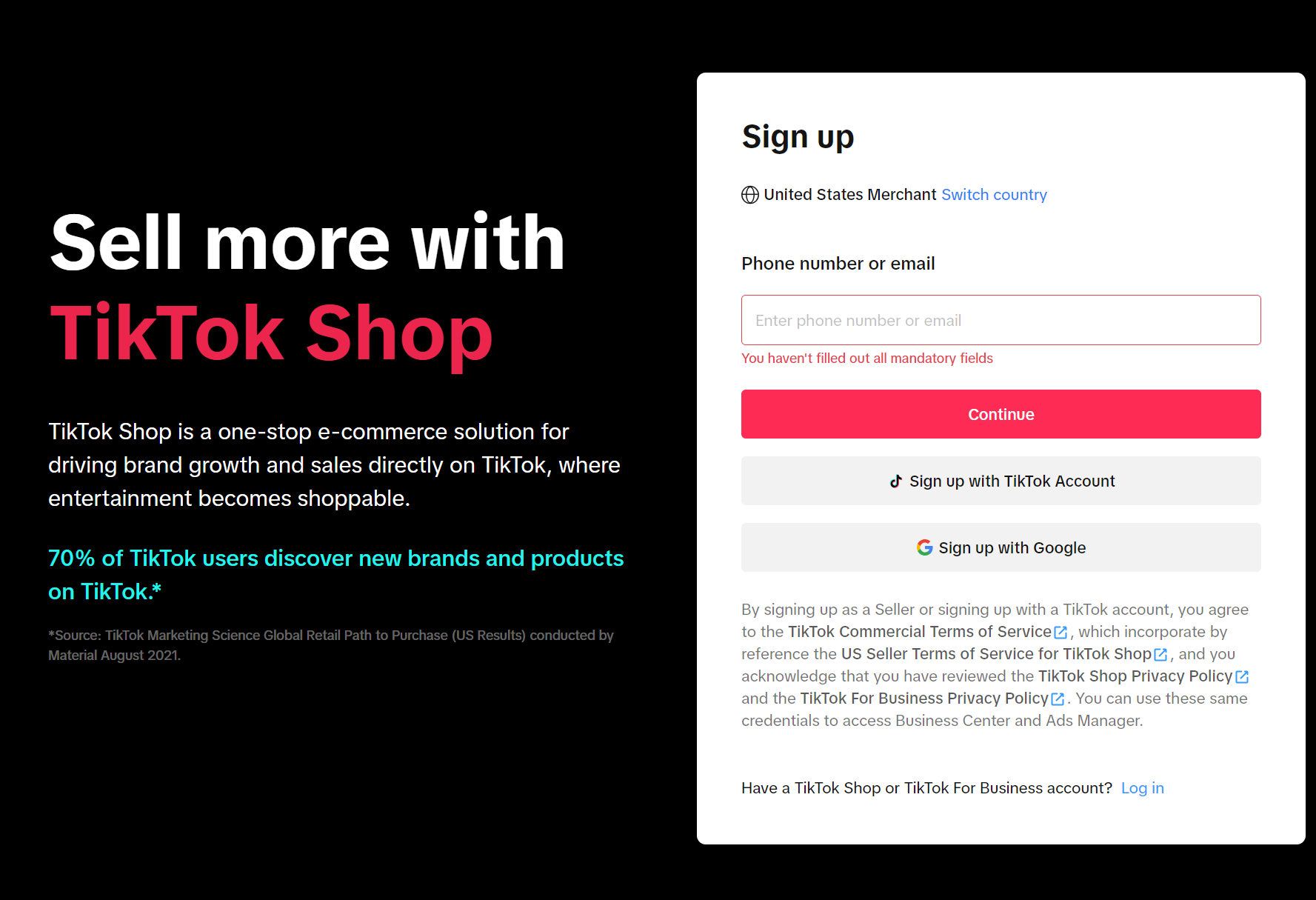
The official registration guide (updated 21 July 2025) and the US homepage describe the same first moves:
Register
Register with your email, phone number, a TikTok account, or another supported login method.
Set the region to US
Setting the region to US is required for US seller rules.
Agree to the terms
Read and agree to the terms.
Enter an invitation code if you have one
Official pages describe this as optional at sign-up.
The homepage then has you verify your identity or business, add a shop name, warehouse or pickup address, and a bank account for payouts, and list products.
Step 2. Verify your identity or business
Choose the seller type that matches your documents — individual seller or a business type such as sole proprietorship, corporation, or partnership — and submit the information and files requested.
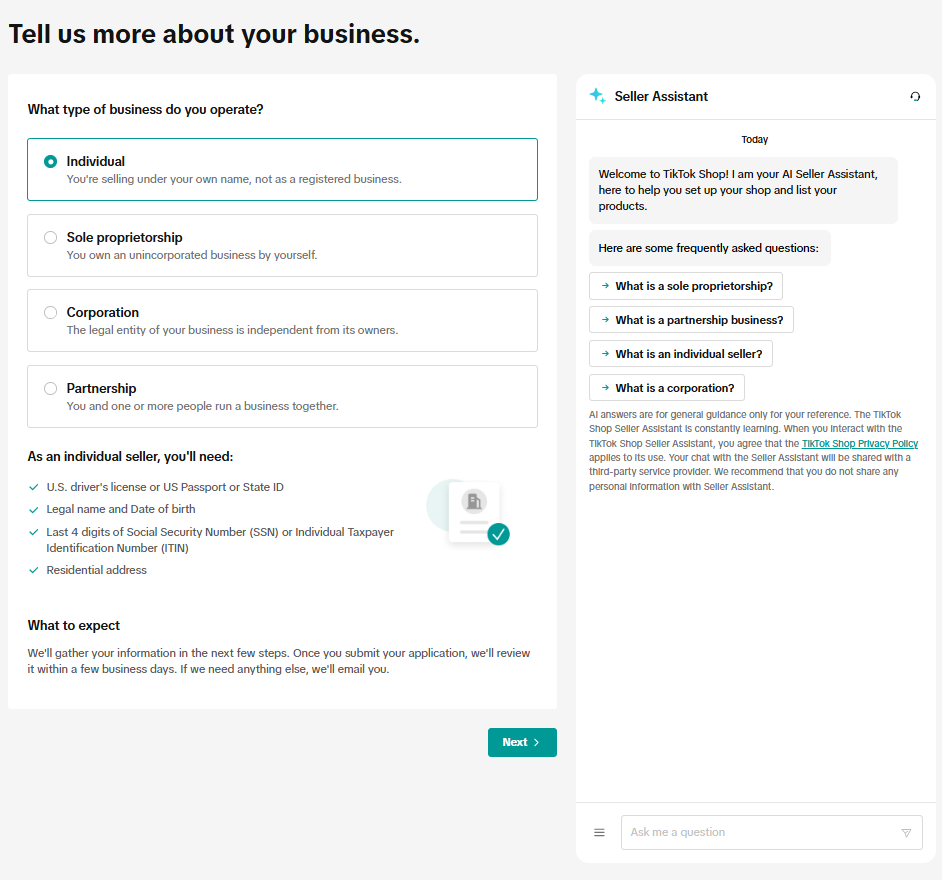
If registration is rejected, official guidance is to review discrepancies, upload a clearer document in an accepted format, and make sure every field matches the document. The shop setup guide also notes that after you submit business information, you may be asked to edit it, and that business sellers may be prompted for UBO information (legal name, government ID, date of birth, residential address, nationality, and the last four digits of a Social Security number).
Step 3. Submit tax information
US-based sellers complete a W-9. The registration guide says non-US sellers complete a W-8. Official advice is that the taxpayer name, EIN or SSN, and tax number must match your documents.

Step 4. Set up your warehouse and shipping
During setup, official guidance says TikTok Shop automatically assigns TikTok Shipping as the default option. You provide a ship-from or pickup address, which is checked against USPS (the default shipping service described on that page). If the address cannot be verified, the system is supposed to hint at a correction. You can add or update warehouse addresses later in Seller Center.
After the shop is open, official US logistics documentation describes three families of options:
FBT and TikTok Shipping have official size and weight limits, which can change. Check TikTok Shop US Logistics Services Overview, the Logistics > Shipping screen in Seller Center, and our US FBT guide for the limits and fee rules that apply to your products. Fulfillment cost is separate from the referral fee. Dispatch deadlines and the $30 free shipping threshold are in US TikTok Shop shipping and free shipping.
Step 5. List your products
Official registration and setup guides say you can:
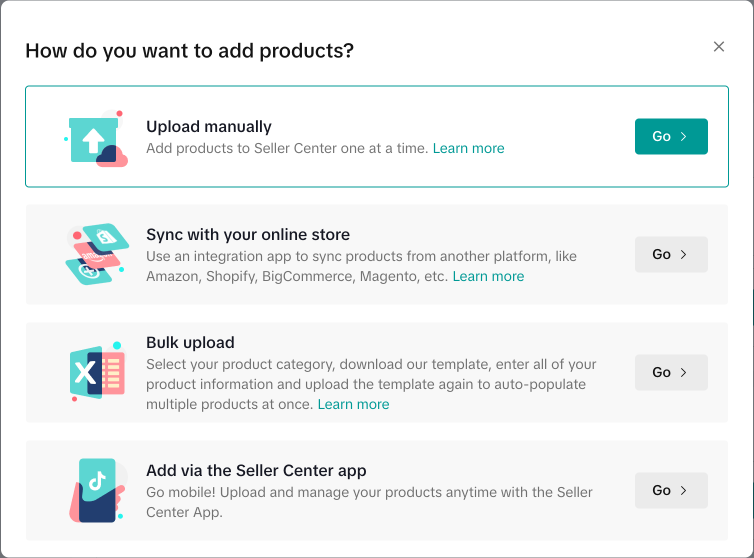
Products are reviewed for compliance. The setup guide says products that pass internal review show as pre-approved, then live once the shop is approved. The registration guide also says products will not be visible until document verification is completed.
We are not going to invent title formulas or “winning” thumbnail rules here. Official listing fields typically include category, title, images, description, price, stock, and shipping dimensions; some categories need extra documents or a size chart. If you are not sure a product is allowed, start from official prohibited-products and category rules in Seller University rather than from unofficial lists.
Products you cannot sell
Official US Seller University policy distinguishes prohibited products (they cannot be sold) from restricted products (they may be sold only if you meet extra requirements and a qualification pathway). The Prohibited Products Policy and Your Guide to Prohibited Products, fetched on 16 November 2026, include — but are not limited to — these buckets:
Step 6. Link one Official TikTok account
Linking an Official TikTok Account is how the shop gets a public face on TikTok. Official rules from the setup and registration guides:
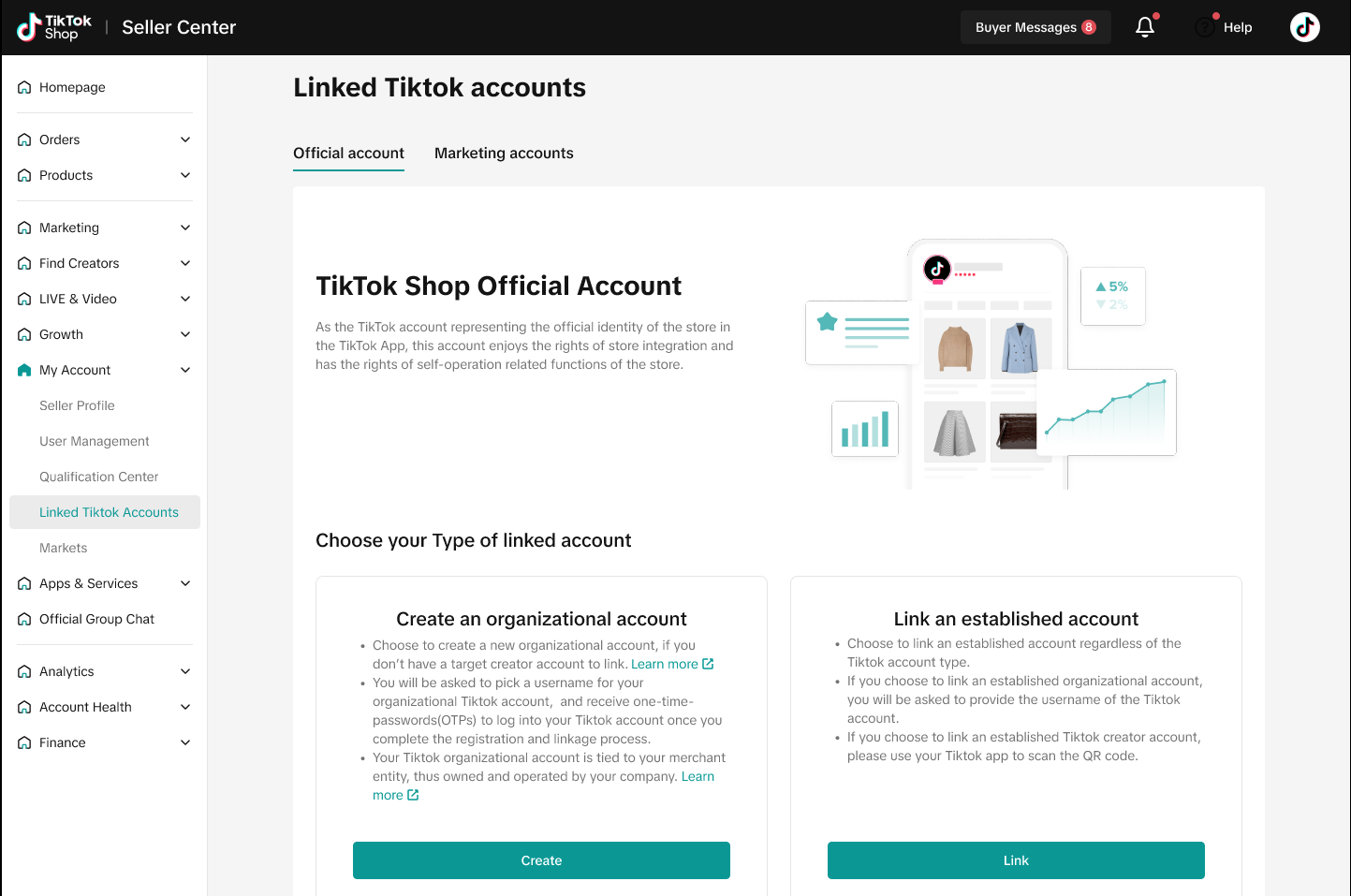
If you also want other creators to sell for you, that is the affiliate program — a different setup from the official account bind. See TikTok Shop Affiliate Program explained.
After you can accept orders
Official pages describe a few things that start once the shop is live:
Sellers can set up to five shops, but official setup guidance says only one shop at a time — you cannot register multiple shops simultaneously.
If you already have an online store
The official registration guide says you can synchronize TikTok Shop with an existing external ecommerce shop, as well as upload products individually or in bulk. We have now published a US Shopify connection guide based on official onboarding and FAQ pages. We have not tested a live store sync, so we will not invent click-by-click app instructions here. If you use an official integration, follow the current screens in that app and in Seller Center, then still complete tax, warehouse, and official-account setup on the TikTok Shop side.
How to get sales after you list
Listing a product does not, by itself, create demand. Official seller materials describe reaching customers through:
We do not have a seller account of our own, so this is a map of official channels, not a playbook of “what worked for us,” posting schedules, or unsourced probation or order-cap rules.
Launch checklist
Use this as a document-and-setup checklist, not as a claim that completing it guarantees approval.
- You meet the official eligibility rules (age, US residence, unique phone and email, accepted ID).
- Identity or business documents are valid, uncropped, and match the Seller Center fields exactly.
- W-9 (or the tax form Seller Center requests for your type) is completed, and names and tax numbers match.
- Ship-from and return addresses are entered; the ship-from address can be verified for TikTok Shipping if you plan to use it.
- Bank account is linked for payouts.
- At least one product is submitted and has a status you can explain from the Manage Products page (submitted, pre-approved, or live).
- One Official TikTok Account is linked, or you have a plan to link it.
- You know your product’s official referral-fee rate and have run it through the fee calculator.
- If you want creator distribution, you have read how open and target collaborations work and set a commission you can afford.
FAQ
How do I set up a TikTok Shop?
Official US steps are: create a Seller Center account with the region set to US, verify your identity or business, submit tax details, add a warehouse or pickup address and a payout bank account, list products, and link one Official TikTok Account. There is no setup fee to join.
How long does TikTok Shop seller approval take in the US?
We have not found a published US approval-time SLA on the official Seller University pages cited in this guide. Some unofficial articles quote short turnaround times, and a UK Seller University page has mentioned a 2–3 day figure for that market. Do not treat those as a US guarantee. Track status in Seller Center.
Is there a fee to start selling on TikTok Shop?
TikTok Shop’s US seller homepage states there is no setup fee to join. The platform then charges a referral fee on sales, generally 6% in most US categories. See TikTok Shop Fees 2026 for the official category table and exceptions.
Who can register as a US TikTok Shop seller?
Official Seller University FAQs say applicants must be at least 18, reside in the United States, use a phone number and email address not already used to open another shop, and provide a valid US passport, driver’s license, or state ID. Politicians are prohibited from becoming sellers. A related corporate-registration page also says governments and political parties cannot become sellers.
Can I sell before I upload tax documents?
Official pages are not fully consistent. A documents guide updated 12 May 2026 says you can start listing and selling without tax documents until you earn $2,000, after which tax documents are required to keep selling and get paid. A setup guide updated 12 September 2025 says products are not visible to shoppers until the W-9 is completed and listings pass internal review. Complete the W-9 during setup and confirm the current rule in Seller Center.
How many shops and official TikTok accounts can I have?
Official setup guidance says a seller can set up to five shops, but only one shop at a time, and cannot register multiple shops simultaneously. Each shop may link to only one Official TikTok Account, and that official account may be changed a maximum of three times.
How do TikTok Shop sellers get paid?
Official US Finances pages checked on 18 November 2026 say payouts are sent automatically to your linked bank account when the settlement amount reaches $1, after delivery and after any open after-sales requests are resolved. Settlement can take 1 to 31 days depending on your tier. The full official walk-through is in How to withdraw money from TikTok Shop.
Sources
All pages below were fetched on 16 November 2026. Official “Updated at” dates are TikTok Shop’s own page dates.
- TikTok Shop US seller homepage — who can sell, signup steps, no setup fee, 6% commission language, payouts.
- Registering for TikTok Shop — official US Seller University, page updated 21 July 2025. Sign-up, verification, tax, first product, official account.
- Beginner’s Guide: What documents do I need to register? — official US Seller University, page updated 12 May 2026. Accepted IDs, file rules, eligibility FAQ, $2,000 tax-document threshold, UBO notes.
- How to set up your TikTok Shop — official US Seller University, page updated 12 September 2025. Five-shop limit, warehouse and USPS check, W-9 visibility rule, official-account rules.
- How to register as a Corporation or Partnership — official eligibility notes for business sellers.
- TikTok Shop US Logistics Services Overview — FBT, TikTok Shipping, and Seller Shipping.
- TikTok Shop Referral Fee Updates — payout threshold and settlement language used in the fees section.
- Prohibited Products Policy — official US policy, fetched 16 November 2026.
- Your Guide to Prohibited Products — official distinction between prohibited and restricted products, fetched 16 November 2026.