TikTok Shop Seller Center Guide
A US Seller Center module guide from official Seller University docs: login, orders, products, finances, and analytics, with official Academy interface figures.

TikTok Shop Seller Center is the official US dashboard for running a shop: products, orders, shipping, payouts, analytics, and affiliate tools. The official US site is seller-us.tiktok.com. The public marketing site seller.tiktok.com is where many people click “Start selling”; once you have a US shop, daily work happens in Seller Center.
This is a module guide, not a sign-up walkthrough. EasyTikTok does not have a TikTok Shop seller account, so we do not invent screens or draw unofficial interface mockups, and we are not using TikTok logos or brand styling on this site. Where a product screen helps, we use official TikTok Shop Academy captures, with a caption and source line. The module map is taken from official US Seller University pages fetched on 16 November 2026. Menu labels and layouts can change; confirm what you see in your own account.
If you do not have an account yet, start with How to become a TikTok Shop seller. For the end-to-end selling workflow, use How to sell on TikTok Shop.
Official US URL and regional shops
Bookmark the official US hostname: seller-us.tiktok.com. Official seller materials say TikTok Shop operates locally in each market, and you sign up for each region separately. A US shop is not managed from another country’s Seller Center.

How to log in
Official troubleshooting is in How to troubleshoot login issues for TikTok Shop (page updated 10 July 2026). That article covers:
The US homepage also lists TikTok account and third-party login as sign-up methods. The official troubleshooting article we fetched focuses on email and phone. If you registered with another method, use that same official login option in Seller Center rather than inventing a workaround.
A map of the main modules
Official Seller University articles describe these areas of Seller Center. This is a topical map, not a pixel-perfect menu.
Manage Orders
An official US article on a redesigned Manage Orders page describes a Pending Action board for time-sensitive cases, including orders that will miss a dispatch SLA (the article refers to a 3 business-day dispatch SLA) within 24 hours, cancellation and return requests, failed label creation, and overdue shipments.
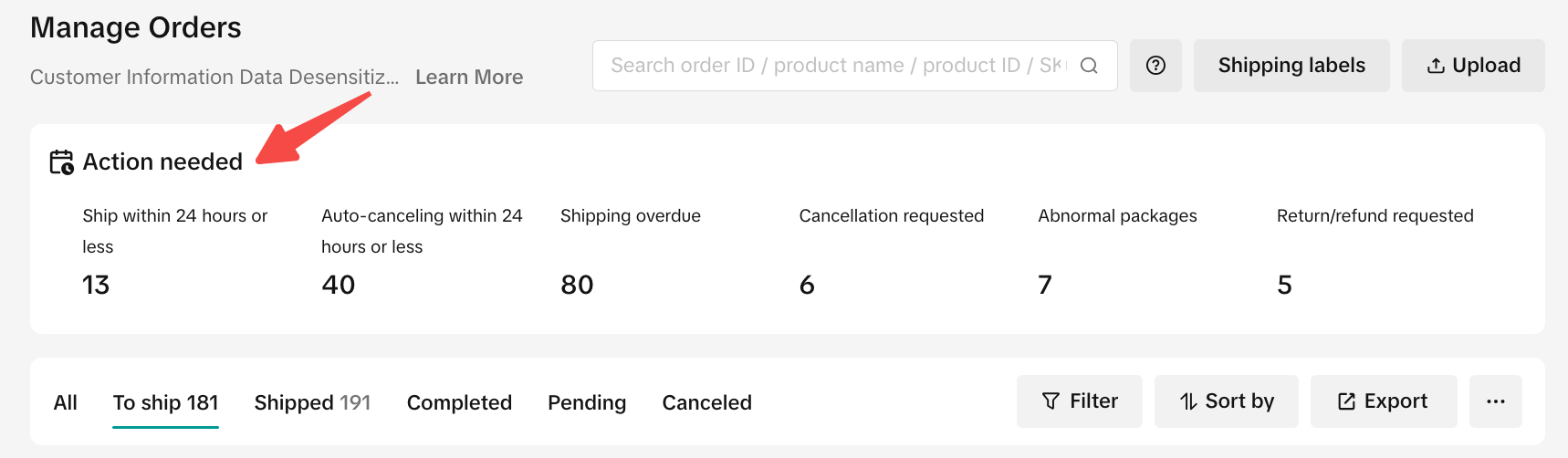
The same documentation describes:
Related official fulfillment articles explain arranging shipment and adding tracking for “shipped by seller” orders, including bulk upload. TikTok Shipping labels are described as being printed from Seller Center → Manage Orders → Arrange Shipment, with tracking updated after the carrier scan.
We are not restating packing tips or unofficial shortcuts. Follow the current Manage Orders screen and the official fulfillment policy that applies to your shipping method.
Products
Official Shop Tab guidance says that after you register, you use Product Builder in Seller Center (described as being in the left-hand navigation beneath Orders) to upload and manage inventory, optimize product display pages, and monitor reviews. You can also sync a catalog from an existing shop; official registration pages list individual upload, bulk upload, and external-shop sync.
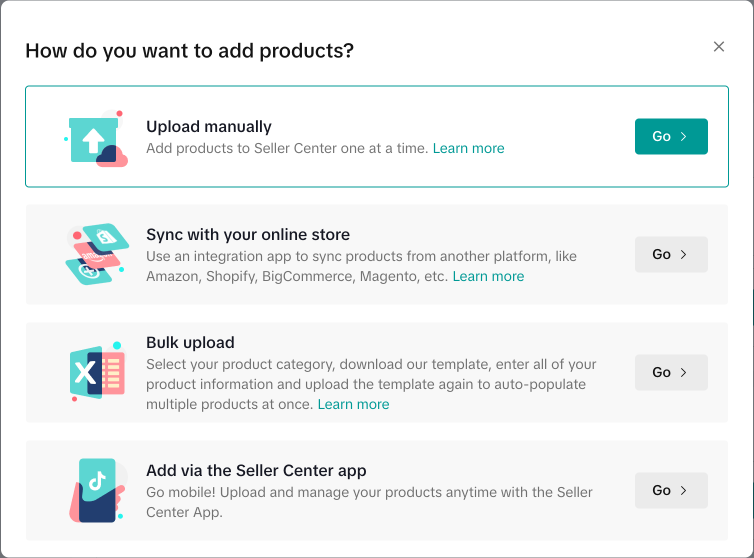
Product-level performance is documented separately under Product Analytics (filters, a time range official pages describe as within the past 90 days, GMV, orders, units sold, traffic, SKU, content and creator rankings, reviews, reversals, inventory, and pricing).
Listing policy, including prohibited products, belongs in the how to sell guide, not in this dashboard map.
Logistics and shipping
Official logistics pages describe three families of options, which we summarize in the how-to-sell guide: Fulfilled by TikTok (FBT), TikTok Shipping, and Seller Shipping. In Seller Center terms:

Size and weight limits, and which option you are eligible for, should be read in Seller Center and in official logistics articles — they can change, and we are not reprinting a full rate card here. For the written US FBT rules we could confirm on 17 November 2026, see Fulfillment by TikTok (FBT, US).
Finances and settlement
Official finance setup is described in Finance & Settlement 101 (updated 10 August 2026).
Linking a bank account can be started from Finances → Overview or My Account → Account Setting → Bank Accounts. Only the shop owner can add or change it. The account holder’s name must exactly match the onboarding name.
If you change the primary account, official text says pending payouts already in transit still go to the old account; later settled funds go to the new one.

Settlement starts at delivery, not at order date. Official tiers, tied in part to Shop Performance Score (SPS), are:
| Official settlement tier | Timeline after delivery | Official eligibility note |
|---|---|---|
| Introductory | 31 days | New or probationary sellers |
| Standard | 8 days | Default for established sellers |
| Accelerated | 5 days | SPS of 3.5 or higher |
| Express | 1 day | SPS of 4.0 or higher |
Official referral-fee pages also say payable orders generally settle after delivery when there is no processing refund, and that you can withdraw once the available balance reaches $1. For the referral-fee math itself, use TikTok Shop Fees (US, 2026) and the fee calculator.
Analytics
Official Shop Analytics documentation describes a consolidated shop-level view of revenue metrics, including GMV definitions (official formulas include list price, items sold, shipping, seller- and platform-funded discounts, and tax treatment), plus breakdowns such as LIVE GMV, video GMV, product-card GMV, AOV, items sold, and customers. Some official metric notes include canceled and refunded orders in GMV — read the definition on the analytics page before you treat GMV as take-home revenue.
Official Product Analytics and Affiliate Seller Analytics pages cover product- and affiliate-specific cuts (including affiliate GMV, orders, items sold, and creator, video, and LIVE performance). Use them as official definitions, not as a promise that every metric will be visible on day one of a new shop.
Affiliate in Seller Center
The official US affiliate marketing page says sellers start in Seller Center under Affiliate → Get Started. Open and target collaborations, the 1%–80% commission range, and payout timing for creators are explained in TikTok Shop Affiliate Program (US, 2026). Affiliate Seller Analytics, as officially described, is the performance dashboard inside Affiliate Center.

Access management and sub-accounts
Official Access Management on Seller Center (dated 26 May 2026) says the shop owner can add staff as sub-accounts under My Account → Account Settings → User Management, assign a default or custom role (you assign roles, not loose individual permissions), and, for multi-region shops, limit operating countries. The invited user must activate by email within 120 hours. Only the shop owner can assign and customize roles.
The same Account Settings area also holds tax information, bank accounts, and warehouse settings.

The same article describes binding multiple seller accounts that share the same business license, including a path for eligible US sellers, and says self-service unbinding is not supported — contact customer service. If you use this, follow the official page rather than a third-party summary.
Help and support
Official Help Center Chat Assistant documentation says you can open it from the Seller Center homepage (a question-mark / “Chat with us” path, or Shop Name → Help & Support → Chat with us) and from the Seller Center app via Chat on the bottom bar. Official text says live agents can be reached daily 9:00 a.m.–9:00 p.m. PT (12:00 p.m.–12:00 a.m. ET), and that the assistant can answer Seller University questions and, in some cases, take you to a relevant Seller Center page.
We have not tested the desktop site or the app, so we do not claim which tasks are “app only” or “desktop only.” If official pages mention both, assume you should confirm in the product.
FAQ
What is the TikTok Shop Seller Center?
It is TikTok Shop’s official dashboard for US sellers, where you manage products, orders, shipping, finances, analytics, and affiliate collaborations. The official US hostname is seller-us.tiktok.com.
What is the official US Seller Center login URL?
Use the official US Seller Center at seller-us.tiktok.com. The marketing site seller.tiktok.com is the public starting point to begin selling. Official pages say shops are regional, so a US shop is managed in the US Seller Center, not in another market’s center.
How do I log in if I forgot my password or lost my email?
Official US troubleshooting (page updated 10 July 2026) says you can reset a password with Forgot Password and a verification code sent to the email or phone on file. You can log in only with the email or phone in Account Information, not the contact details under Seller Information. If you still have one of those two methods, you can log in with it and update the other under Profile, then Settings, then My Profile, then Account Information, then Login Information. If you have lost both, official guidance is to contact customer service with your SID or Shop Code, a selfie holding accepted US ID, and the original phone or email.
When do US sellers get paid in Seller Center?
Official finance guidance says the settlement clock starts when the order is delivered, not when it is placed. New or probationary shops are on an Introductory 31-day post-delivery timeline. Established shops default to Standard (8 days), with Accelerated (5 days) at a Shop Performance Score of 3.5 or higher and Express (1 day) at 4.0 or higher. Official referral-fee pages also describe a $1 withdrawal threshold after payable orders settle.
Can I add staff to my Seller Center account?
Yes. Official access-management guidance says the shop owner can add sub-accounts under My Account, then Account Settings, then User Management, assign default or custom roles, and that only the owner can assign or customize roles. New users must activate an email invitation within 120 hours.
Sources
All pages below were fetched on 16 November 2026. Official “Updated at” or page dates are TikTok Shop’s own.
- TikTok Shop US Seller Center and TikTok Shop US seller homepage.
- How to troubleshoot login issues for TikTok Shop — official US Seller University, page updated 10 July 2026.
- New Manage Orders Page Launch! — official Manage Orders redesign and Pending Action board.
- How to Process “Shipped by Seller” Orders? and Logistics & Fulfillment: Shipping Options, Policies, and Best Practices.
- The Seller Guide to Shop Tab Success — Product Builder and analytics entry points.
- How to navigate Shop analytics in Seller Center, How to Use Product Analytics, and How to Use Affiliate Seller Analytics (v3 Upgrade).
- Finance & Settlement 101 — official US Seller University, page updated 10 August 2026.
- Access Management on Seller Center — dated 26 May 2026.
- Help Center Chat Assistant — official access paths and live-agent hours.
- Affiliate Marketing | TikTok Shop — Affiliate → Get Started path.
- TikTok Shop Referral Fee Updates — $1 withdrawal threshold.